
Create an Image Editing App with Google AI Studio
Image Editing App Creation Steps (Complete in 3 Steps!)
With Google AI Studio, you can create an image editing app in typically 1-3 minutes with zero programming knowledge.
💡 Note: Creation time varies depending on complexity. More complex apps may take longer, and creation may sometimes fail.
What You Need
- Google account
- Internet connection
App Creation Steps
Step 1: Access and Login
- Visit https://aistudio.google.com
- Sign in with your Google account
Step 2: Click the Build Button
- Select the “Build” button on the left side of the screen
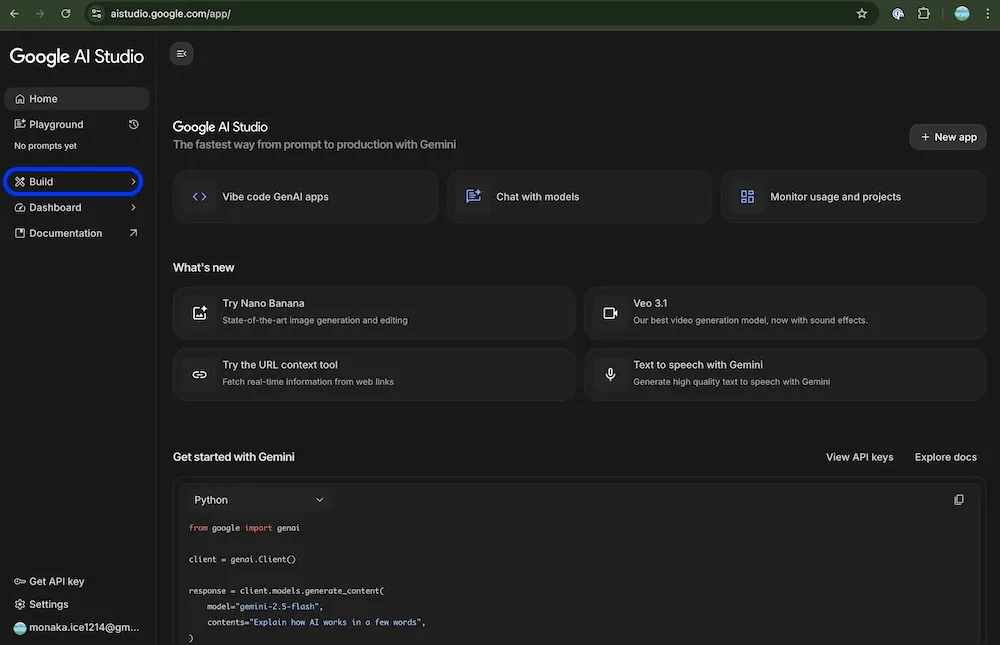
Step 3: Give Instructions in Plain Language
- Describe the app you want to create in plain language (see example prompt below)
- Click the “Build” button
- Typically wait 1-3 minutes and your app is ready!
Prompt Input Location
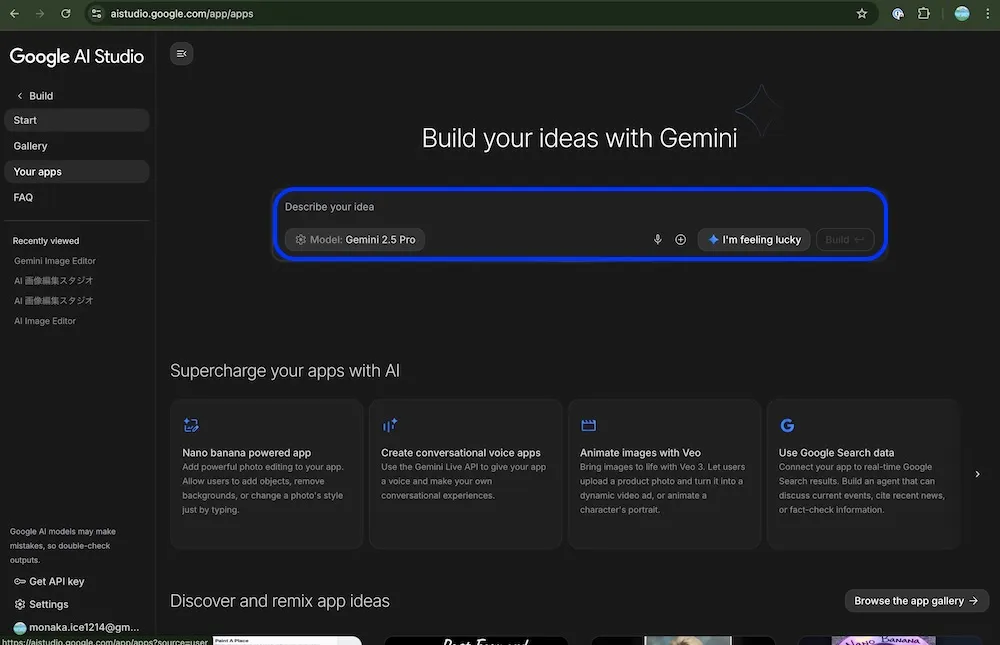
Example Prompt
# Create an app that edits images according to instructions.

- On the left, there's an area where users can upload the original image by clicking or dropping
- Images can be replaced
- In the middle, there's an area for specifying changes
- The change specification area includes an area to upload a reference image and a text prompt area for detailed instructions
- Reference images can be uploaded by clicking or drag-and-drop
- On the right, display the generated image
- There's a button to download the generated image
💡 Tip: Use markdown format for your instructions to AI
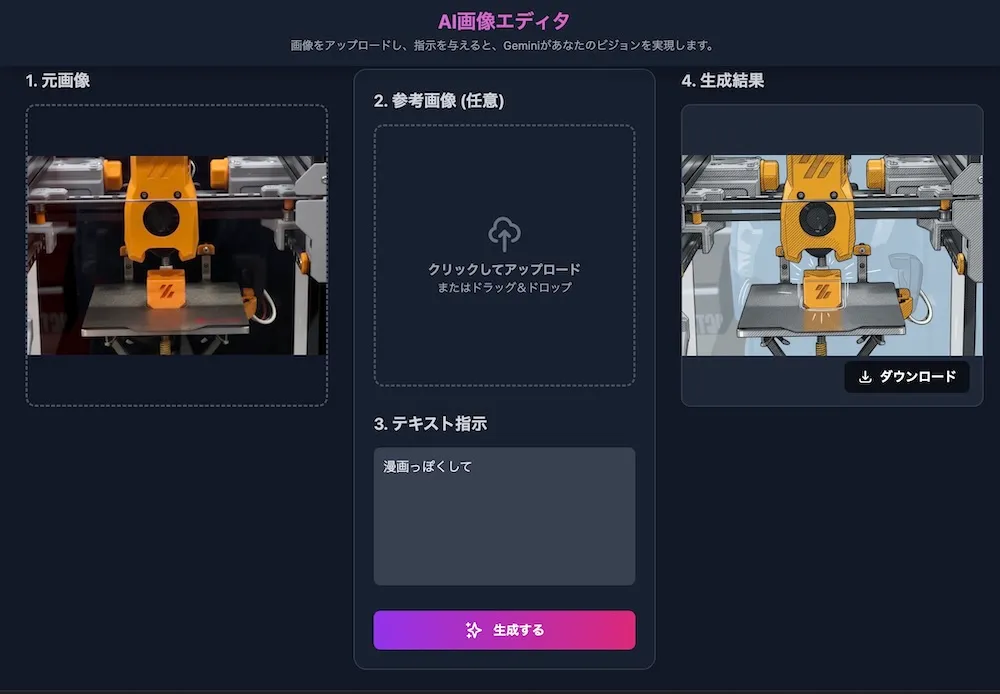
Completed App
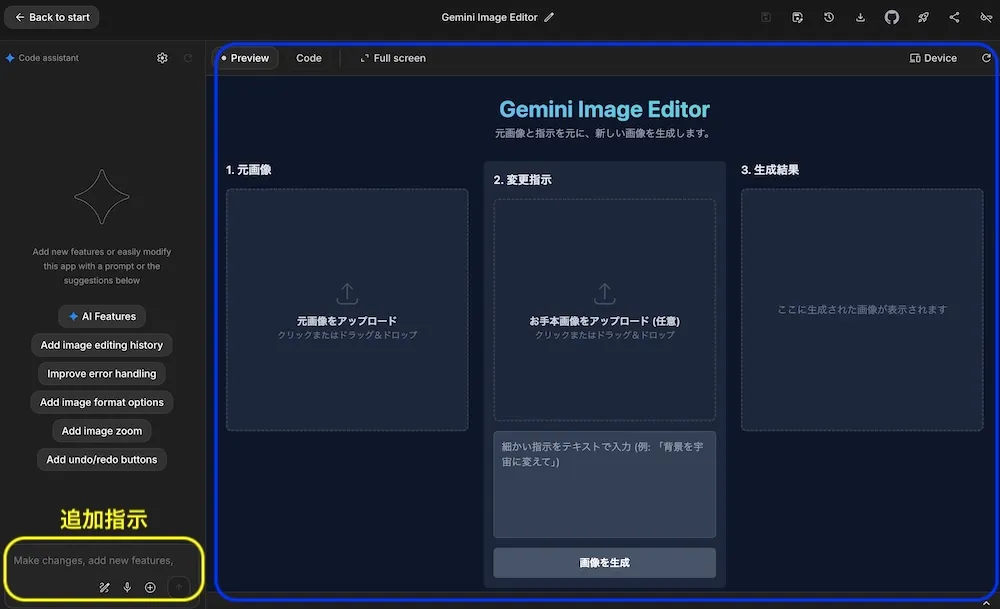
💡 Tip: You can improve functionality with additional instructions after completion
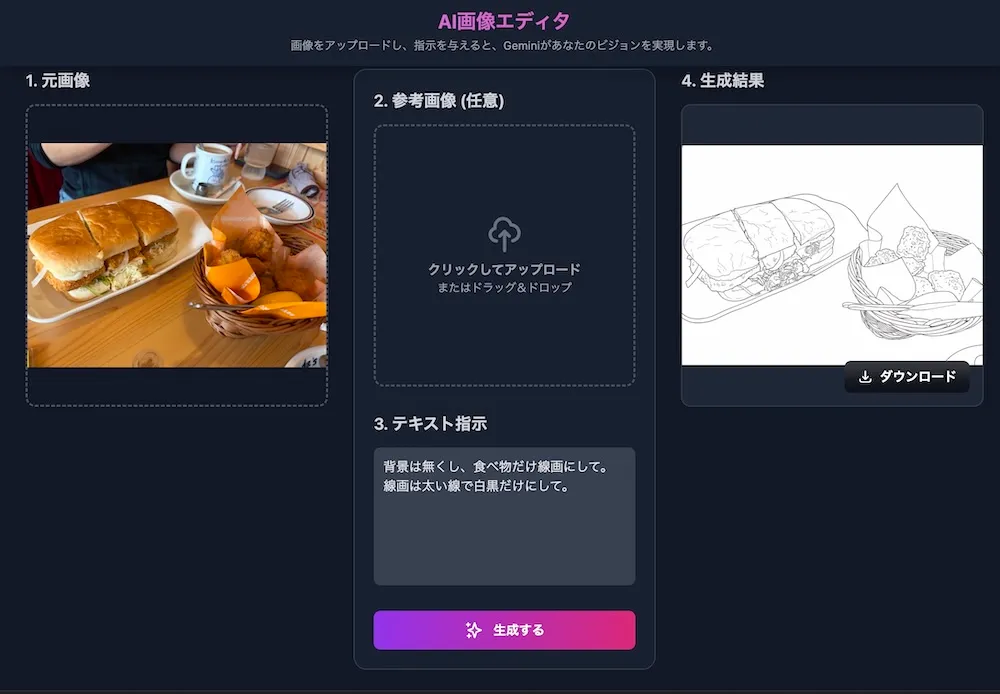
Image Editing Examples
What is Google AI Studio?
Google AI Studio is an online development environment for testing the power of the latest AI models (like Gemini) and quickly building app prototypes. It’s free within the free token quota. Even without programming skills, you can simply ask in plain language “create this kind of app” and the AI will automatically build it for you.
Features:
- ✅ Free within the free token quota
- ✅ No programming required
- ✅ Apps typically ready in 1-3 minutes (though complex cases or failures may occur)
- ✅ Utilize Gemini and Gemma for text generation, image generation, and video analysis
- ✅ Practical for developers with API integration and customization
Tips for Writing Prompts
Following these points, like in the example above, will help you create better apps:
- Write features as bullet points: Be clear with phrases like “can do ~” or “has ~”
- Describe screen layout: Be specific about spatial relationships using “on the left,” “on the right,” “in the middle,” etc.
- Describe user actions: Specify interaction methods like “click,” “drag & drop,” “upload,” etc.
- Be specific: Being concrete rather than vague will result in apps closer to your vision
Save Completed App
When you’ve created a useful app, we recommend saving it.
How to Save:
- Select “Save” from the menu in the upper right corner
- Enter a project name and save
- The project is saved to Google Drive and accessible anytime later
By saving, you can resume editing anytime and manage versions.
Sharing with Friends (Free Version)
- Click the “Share” button in the upper right corner
- A URL is generated
- Copy the URL and send it to others
Sharing Features:
- Free within the free token quota
- Can share with unlimited people
- Viewers need to sign in with Google (free version limitation)
Recommended For
✅ Programming beginners ✅ Those who want to try creating an image editing app ✅ Those who want to quickly realize ideas ✅ Those who want to try AI for free
Reference Video
Google AI Studio is a convenient tool that truly allows you to create apps without programming knowledge. Since you can try the latest AI technology within the free tier, give it a try!
Referenced video is here↓
Reference Video: AI Saborou Channel: 【Super Easy】Create an Image Editing App at Lightning Speed with Google AI Studio! 【It’s Fun】
Reference Article: Note - AI Saborou Channel
Reference Links
📋 Supplementary Information & Notes
📚 Glossary
| Term | Meaning |
|---|---|
| Google AI Studio | A tool provided by Google for creating apps using AI |
| Build Feature | A feature that allows you to create apps with just plain language instructions, no programming required |
| Gemini | Google’s AI. The Google equivalent of ChatGPT |
| Prompt | Instruction text for AI |
| API | A mechanism for connecting apps together |
| Deploy | Publishing a created app online |
💰 About Pricing
Basically free within the free token quota.
💡 Important: Usage beyond the free token quota may result in pay-as-you-go charges. Image generation in particular has usage limits, and the free quota can quickly be exhausted. Generation may also be rejected by safety filters.
Free vs Paid Differences
| Item | Free (Share) | Paid (Deploy) |
|---|---|---|
| Price | Free within free token quota | Pay-as-you-go |
| Sharing Method | Only those with URL | Anyone can access |
| Login | Viewers also need Google login | No login required |
| Use Case | Personal use, prototyping, learning | Production service operation |
💡 About Build Mode: Build mode does not require an API key. However, external published versions (Deploy) may require one.
⚠️ Note: Pricing structure may change without notice. Please check the official site for the latest information before use.
⚠️ Usage Precautions
1. Data Handling
Data you input may be used to improve Google’s AI.
🚫 Never Input:
- Company confidential information, internal documents
- Others’ personal information (addresses, phone numbers, etc.)
- Passwords, credit card numbers
- Secrets you can’t tell others
2. Age Restrictions
Google AI Studio is only available for users 18 years and older (per Gemini API Terms of Service). While Google accounts can be created from age 13 in many countries including Japan, Google AI Studio has a separate age restriction of 18+. For details, see Gemini API Terms of Service.
💭 Hands-On Experience
Positive Points:
- Really simple, no programming knowledge needed
- Working app typically completes in minutes
- Can give modification instructions in natural language
- Free tier access to advanced AI features
Points of Concern:
- Complex features can sometimes be difficult
- Creation may fail in some cases
- Manual adjustment may be needed for fine design details
- Cannot input confidential information
- Free tier for image generation has strict limits
🔗 Other Reference Links
Article Created: November 18, 2025 Last Updated: November 20, 2025
※The information in this article is current as of November 20, 2025. Google AI Studio’s service content and pricing structure may be updated at any time, so please check the official site for the latest information.