DigiCode
Browser-based block programming for microcontrollers
For ESP32 — by Digico, LLC (operator of FabLab Westharima)
AI block generation & AI help (cloud API or local LLM),
no Arduino IDE required, with 6 flashing paths: USB / BLE (beta) / Wi-Fi OTA (beta) / .bin / Home Assistant OTA
(Wi-Fi batch also beta).
Supports 16 boards across the ESP32 family.
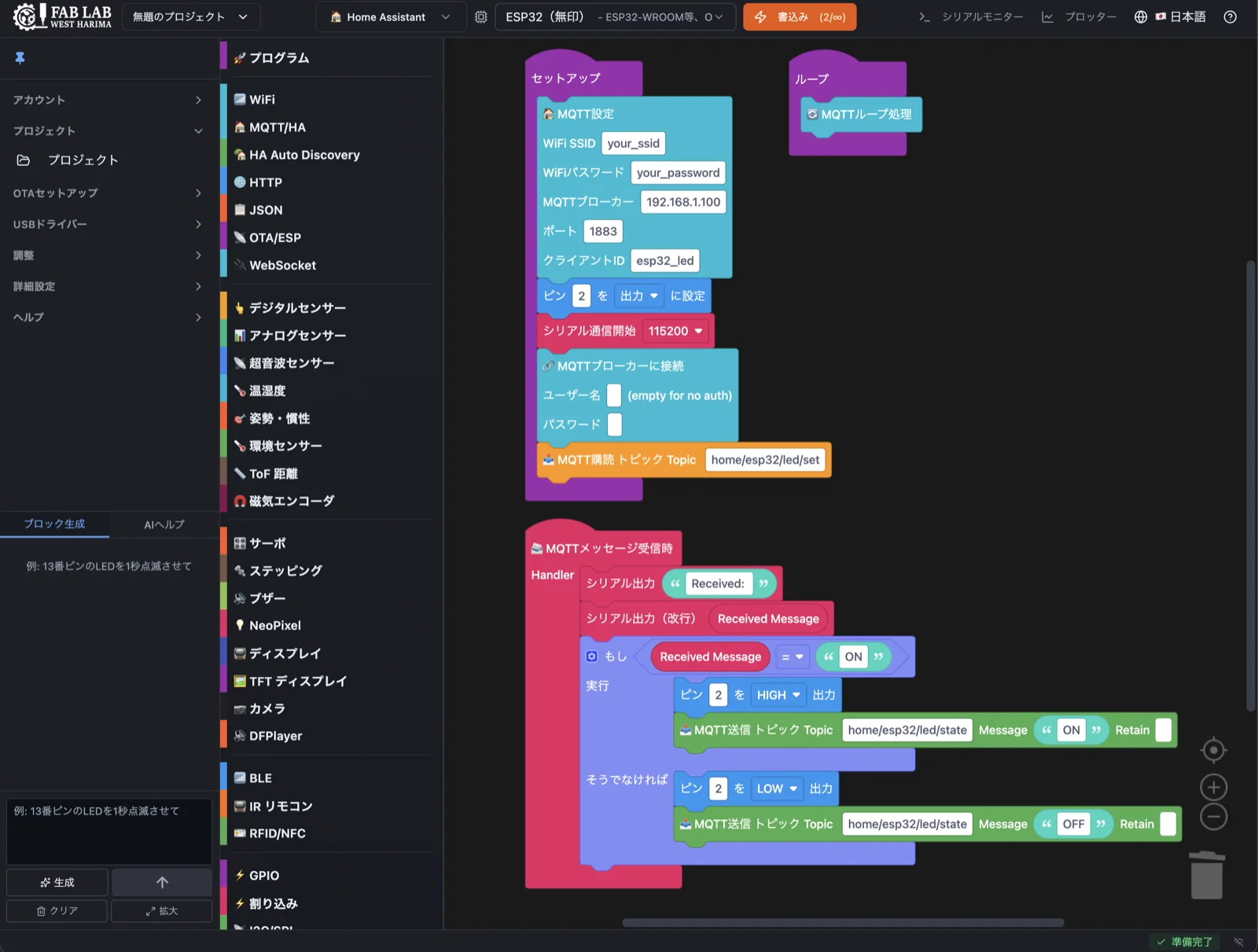
▲ The actual DigiCode editor (example: ESP32 + MQTT / Home Assistant integration)
⚡ At a Glance
No installation required — start programming microcontrollers right from your browser
From logic to IoT and Home Assistant
ESP32 / M5Stack / XIAO
USB / BLE(β) / Wi-Fi OTA(β) / .bin / HA OTA + batch β
EN / JP / ES / PT / ZH-TW
💡 What is DigiCode?
DigiCode is a browser-based visual programming environment for ESP32 microcontrollers. Built on Google Blockly, it auto-generates Arduino-flavored C++ code from blocks and handles cloud compilation and firmware flashing — entirely inside your web browser.
DigiCode is developed and operated by Digico, LLC, the company behind FabLab Westharima (Sayo-cho, Hyogo, Japan). Born from challenges encountered while running a fab lab and designing original hardware, DigiCode aims to let educators, fab spaces, and makers focus on what they want to build — not on fighting hardware variation.
🛠️ Origin Story
DigiCode was born at FabLab Westharima while we were designing educational robots and IoT devices — including PCBs and enclosures.
Existing block-programming tools dictated which boards and pin assignments you could use, forcing us to adapt our hardware design to fit the editor's constraints. Even when we designed our own microcontroller boards or breakout boards, the editor wouldn't recognize them.
"Then let's build the editor too." That was the trigger. On top of that, existing tools required Arduino IDE installs and were limited to USB cable flashing — both impractical for classrooms and workshops. So we set out to build a tool that runs entirely in the browser and supports wireless flashing.
🎯 Who It's For & System Requirements
👥 Designed for
- ✓ Teachers running microcontroller classes in schools
- ✓ Workshop organizers and fab-space operators
- ✓ Beginner students learning to program hardware
- ✓ Robotics competition teams
- ✓ Makers and hobbyists exploring IoT / electronics
🌐 System requirements
- ✓ Browser: Google Chrome / Microsoft Edge (latest)
- ✓ OS: Windows / macOS / Linux (desktop)
- ✓ Web Serial API and Web Bluetooth API support
- ✓ No installation required (except optional companion tools)
- ✓ USB driver: CP2102 or CH340 (depending on board)
🔧 Core Features
Block editing, cloud compilation, and flashing — all in the browser
Browser-only workflow
No Arduino IDE or other installs. Build blocks, compile, and flash entirely from the browser. Cloud compilation means your local PC specs don't matter.
Six flashing paths
USB wired (Web Serial API), BLE (Web Bluetooth API, beta), Wi-Fi OTA (beta), plus .bin export and Home Assistant OTA delivery. Wi-Fi batch flashing (beta) targets classrooms updating many devices at once.
570 Blockly blocks
Logic, loops, math, and text basics — plus blocks for sensors, motors, servos, NeoPixels, OLED, MQTT, Home Assistant, and more.
Serial Monitor / Plotter
Built-in Web Serial monitor and real-time plotter, both launched from the "Monitor ▼" header dropdown.
Beyond text output via Serial.print(), numeric values render as live line
charts — sensor debugging and tuning stays inside the browser.
Class management (Enterprise)
Create classes, issue student accounts, distribute assignments (Blockly XML + PDF), review submissions, grade, and request resubmissions — all in one place.
MFA & security
Email + password authentication, passkeys (WebAuthn), email OTP two-factor, trusted device support, and recovery codes.
5 languages & companion tools
UI in English, Japanese, Spanish, Portuguese, and Traditional Chinese. The DigiCode Finder desktop app (Tauri v2 — Win/Mac/Linux) auto-discovers devices on your network via mDNS.
🤖 AI Features (BYOK)
Generate blocks from natural-language prompts and ask an AI assistant for help.
DigiCode uses a BYOK (Bring Your Own Key) model — bring your own AI provider API key.
AI Block Generation
Natural language → Blockly blocks
Generate Blockly blocks from natural-language prompts and add them to your workspace automatically.
Multilingual prompts supported (English, Japanese, Chinese, Spanish, and more).
AI Help (Chat)
Conversational assistant for DigiCode
Ask questions about how to use DigiCode in a conversational format. Conversation history is preserved and can be exported.
Helps users learn the editor and troubleshoot common issues alongside block generation.
🔑 Why BYOK
- Privacy: Your API key is stored in your browser's localStorage. Prompts and generated outputs never pass through Digico's servers.
- Cost: AI usage is billed by your chosen provider directly. Digico does not bill or mark up AI usage.
- Flexibility: Switch between providers and models freely. Reuse API keys you already have.
🌐 Supported AI providers
- ✓ OpenAI (GPT family)
- ✓ Anthropic Claude
- ✓ Google Gemini
- ✓ Local LLM — connect to an OpenAI-compatible endpoint running on your own PC (Ollama, LM Studio, etc.). No API billing, no data leaves your machine.
See each provider's official site for the latest model names, pricing, and rate limits.
How to get an API key
·
About Local LLM
(in-app help)
⚠️ AI Block Generation is currently in MVP stage: generations are append-only (added to existing blocks) and one-shot (no carry-over from previous prompts). Wi-Fi/BLE blocks are not included in some robot modes — these are known limitations we plan to improve.
🔌 Supported Boards
ESP32, M5Stack, and Seeed XIAO families
Generic ESP32
- • ESP32 (original) — most common
- • ESP32-S3 — high performance
- • ESP32-C3 — low power, RISC-V
- • ESP32-C6 — Matter-ready
M5Stack family
- • M5Stack Basic
- • M5StickC Plus
- • ATOM Lite / Matrix / ATOMS3 Lite
- • M5Stamp Pico / C3 / S3A / S3 BAT
Seeed XIAO family
- • XIAO ESP32C3
- • XIAO ESP32S3 — with camera support
- • XIAO ESP32C6
✨ What Makes DigiCode Different
Capabilities you won't find in tools like mBlock or ArduBlock — built for hardware design, education, and real-world IoT
Custom GPIO pin assignments
Override the default pin numbers used by each block to match your own hardware. Save assignments as presets and switch between them per project or board.
PID tuning tool
Tune Kp/Ki/Kd via sliders for line-following, wall-following, speed and angle control. Save presets and stream values to a connected ESP32 in real time — a major time-saver for robotics competitions.
Batch OTA flashing
Flash multiple ESP32 devices simultaneously over Wi-Fi OTA. Designed for classrooms and workshops where 10–20 robots need to be updated at once. Per-device progress is shown live. * Currently a beta feature — large-scale validation is ongoing.
MQTT / Home Assistant blocks
21 MQTT communication blocks plus 47 Home Assistant Auto Discovery blocks. Define entities (sensors, switches, lights, fans, covers, scenes, etc.) right from the block editor — they auto-register with Home Assistant. A single "Diagnostics Auto" block auto-publishes WiFi RSSI, uptime, free heap, and last reset reason as diagnostic entities, giving you device-health visibility on the HA Dashboard out of the box. Complex control flows that are awkward to express in ESPHome YAML can be built freely using Blockly's loop, conditional, and function blocks.
Firmware delivery via Home Assistant OTA
Build firmware from blocks and deliver it through a Home Assistant Update entity. Export the compiled .bin from DigiCode, register it with HA, then trigger OTA updates from the Home Assistant dashboard (Phase 1+2 implemented).
Auto-generated controller UI (BLE / Wi-Fi)
Drop in BLE or Wi-Fi controller blocks and a matching web UI (buttons, sliders, joystick, etc.) is generated automatically, letting you remote-control ESP32 from the browser. Useful for robotics competition remotes and demo rigs without writing a mobile app.
Hardware-tuning UIs (servo pulse / trim / PID)
Adjust per-servo pulse width range (min/max) and zero-point trim via browser sliders, alongside PID gains (Kp, Ki, Kd). Save presets, switch them per project, and stream values to the connected ESP32 in real time — a self-contained way to absorb hardware variation after assembly.
Local LLM support (no API billing)
Drive the AI features (block generation, help, UI customization) with a local LLM via Ollama, LM Studio, or any OpenAI-compatible endpoint. No API billing, no data sent externally. Model-sizing guidance is in the in-app help page.
Local compile server (Docker)
Run our public Docker image (ghcr.io/fablab-westharima/digicode-compile-api) locally to compile from your own machine. Same image as our cloud, so results match exactly. Works
offline and doesn't consume your cloud compile quota.
🏫 Class Management for Education
Instructors create classes, issue student accounts, distribute assignments, and grade — all from one UI
📚 Create & manage classes
Choose between Workshop (1-month) and Classroom (4-month) classes. Up to 3 classes × 40 students per admin (120 students total). Auto-deletion at expiry, with banner warnings beforehand.
👥 Bulk student account creation
Paste a list of names and the system auto-generates login IDs and initial passwords. Download all credentials as CSV/HTML for distribution. Students can change their own passwords later.
📝 Assignment distribution (Blockly + PDF)
Distribute Blockly XML templates and PDF supplements to your whole class with year/month/day deadlines. Each student can only edit their own answer file (anti-cheating).
✅ Submissions, grading & rework
Students save and submit answers. Admins see a progress dashboard, view answers in a read-only Blockly viewer, score (0–100) with comments, or send back for revision.
📦 Clone & export class records
Clone an existing class's assignment templates (PDFs included) into a new class with one click. Export completed classes as ZIP archives (assignments, answers, grades CSV, student list).
🔄 Lifecycle management
Expired classes auto-delete at midnight JST, with banner alerts 7 days prior. On cancellation, a 1-month grace period applies before deletion. Students consume the admin's Enterprise compile quota (unlimited).
🎬 Demo Videos
Seven short videos walking through the core features.
1. Language Switch
2. Board Selection
3. Block Placement
4. Compile
5. AI Code Generation
6. Serial Monitor & Plotter
7. Browser UI Control
💰 Pricing
4 plans, paid plans starting at $5/month. The Free plan is permanently free.
See pricing for your region below.
ℹ️ Prices shown exclude tax. Applicable VAT / sales tax for your country or region will be added at checkout.
| Feature / Plan |
Guest $0 (no signup) |
Free $0/mo |
Lite $5/mo |
Pro $10/mo |
Enterprise $20/mo |
|---|---|---|---|---|---|
| Cloud compile quota (per month) * Unlimited when paired with the local compile server (Docker) | 50* | 50* | 250* | 500* | Unlimited |
| Block programming (570 blocks) | ✓ | ✓ | ✓ | ✓ | ✓ |
| USB / BLE / Wi-Fi OTA / .bin / Home Assistant OTA flashing | ✓ | ✓ | ✓ | ✓ | ✓ |
| PID tuning & servo trim | ✓ | ✓ | ✓ | ✓ | ✓ |
| MQTT / Home Assistant integration | ✓ | ✓ | ✓ | ✓ | ✓ |
| Local compile server (Docker) | ✓ | ✓ | ✓ | ✓ | ✓ |
| 🤖 AI block generation & AI help (BYOK) OpenAI / Claude / Gemini / Local LLM | — | — | ✓ | ✓ | ✓ |
| Servo pulse-width tuning | — | — | — | ✓ | ✓ |
| Custom block pin assignments | — | — | — | — | ✓ |
| Class management (for education / workshops) | — | — | — | — | ✓ |
📌 Billing & Subscription
- Payment provider:
- 🌏 Outside Japan: Merchant of Record (multi-currency, coming soon)
- 🇯🇵 Japan residents: Stripe (Japanese yen)
- Term: Monthly auto-renewal. Cancel anytime via the provider's customer portal; invoices and receipts are downloadable.
- Mid-term refunds: No prorated refunds — service continues to month-end, then stops.
- Defects / service issues: Reach us via the contact form within 7 days of subscription and we'll issue a refund or extend your subscription one month.
- Legal: Terms of Service / Refund Policy / Privacy Policy
📖 Documentation
From getting started, hardware setup, troubleshooting, to advanced topics
Set up and flash your first program over USB
List of validated devices
Detailed reference for every block
Wi-Fi OTA / BLE configuration
Common issues and solutions
FAQ, architecture, local server setup, and more
Get started with DigiCode
Free plan available — paid plans start at $5/month.
Just open your browser and start programming microcontrollers.