VSCode Basic Operation Manual
Installation
Windows
- Go to VSCode official site
- Click “Download for Windows”
- Run the downloaded
.exe file - Click “Next” in setup wizard
- Check these options in Additional Tasks:
- ☑ Create desktop icon
- ☑ Add “Open with Code” to context menu
- ☑ Register as editor for supported file types
- Click “Install” → “Finish”
Mac
- Go to VSCode official site
- Click “Download for Mac”
- Extract the downloaded
.zip - Drag
Visual Studio Code.app to Applications folder - Launch from Launchpad
⚠️ If “unidentified developer” warning appears: Right-click → “Open”
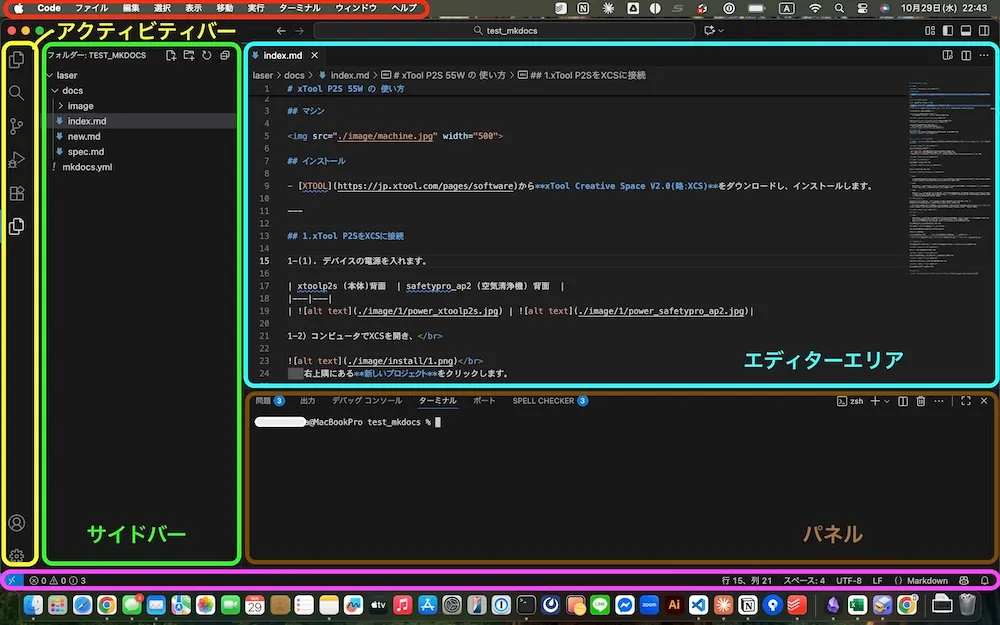
Interface Overview
| Element | Description |
|---|
| Menu Bar | File, Edit, View menus |
| Activity Bar | Left vertical bar. Explorer, Search, Git, Extensions |
| Side Bar | Shows content selected in Activity Bar |
| Editor Area | Write code here. Multiple tabs supported |
| Panel | Terminal, Output, Problems |
| Status Bar | Line number, encoding, Git info |
Keyboard Shortcuts
Basic Operations
| Function | Windows | Mac |
|---|
| Command Palette | Ctrl + Shift + P | ⌘ + Shift + P |
| Open File | Ctrl + O | ⌘ + O |
| New File | Ctrl + N | ⌘ + N |
| Save | Ctrl + S | ⌘ + S |
| Save All | Ctrl + K S | ⌘ + K S |
| Close | Ctrl + W | ⌘ + W |
Toggle Views
| Function | Windows | Mac |
|---|
| Toggle Sidebar | Ctrl + B | ⌘ + B |
| Toggle Panel | Ctrl + J | ⌘ + J |
| Toggle Terminal | Ctrl + @ | ⌃ + @ |
Editing
| Function | Windows | Mac |
|---|
| Copy Line | Shift + Alt + ↓ | Shift + Option + ↓ |
| Move Line | Alt + ↑/↓ | Option + ↑/↓ |
| Multi-cursor | Ctrl + Alt + ↑/↓ | ⌘ + Option + ↑/↓ |
| Toggle Comment | Ctrl + / | ⌘ + / |
Recommended Extensions
| Extension | Purpose | Publisher ID |
|---|
| Prettier | Code auto-formatting | esbenp.prettier-vscode |
| Live Server | HTML live preview | ritwickdey.LiveServer |
| Markdown All in One | Markdown support | yzhang.markdown-all-in-one |
| Auto Rename Tag | HTML tag auto-pairing | formulahendry.auto-rename-tag |
| Code Spell Checker | Spell checking | streetsidesoftware.code-spell-checker |
| GitLens | Git enhancement | eamodio.gitlens |
| indent-rainbow | Indent colorization | oderwat.indent-rainbow |
⚠️ Security Notes
Always verify when installing extensions:
| Check Item | Details |
|---|
| Publisher ID (Critical) | Verify correct publisher ID above |
| Download Count | Should be millions |
| Reviews | Many positive reviews |
| Last Updated | Regularly updated |
Practice: Create HTML File
Step 1: Open Folder
File → Open Folder → Select working folder
Step 2: Create New File
In Explorer, click “New File” → Enter index.html
Step 3: Enter Code
Type ! then press Tab for HTML template (Emmet)
<!DOCTYPE html>
<html lang="en">
  <head>
    <meta charset="UTF-8" />
    <title>Title</title>
  </head>
  <body>
    <h1>Heading</h1>
    <p>Content</p>
  </body>
</html>
Step 4: Save and Preview
- Save:
Ctrl + S (Mac: ⌘ + S) - Live Server: Right-click → “Open with Live Server”
Practice: Create Markdown File
Create File
Create new file named article.md
Preview
| Action | Windows | Mac |
|---|
| Preview | Ctrl + Shift + V | ⌘ + Shift + V |
| Side-by-side Preview | Ctrl + K V | ⌘ + K V |
Troubleshooting
| Problem | Solution |
|---|
| Slow performance | Disable unused extensions. Run “Developer: Reload Window” |
| Won’t start | Disable extensions. Reset settings. Reinstall |
AI Integration: GitHub Copilot
| Feature | Description |
|---|
| Code Completion | Predicts and suggests next code |
| Next Edit Suggestions | Predicts where to edit next |
| Agent Mode | Delegate tasks for AI to execute |
| Chat | Answers questions about code |
Pricing: $10/month (Free for students/educators)
Reference Links